
Managed IT Services for Mission-Driven Organizations in BC: What You Need to Know
Managed IT services give mission-driven organizations ongoing support for the technology their work depends on, including computers, email, cloud tools, cybersecurity, backups, and staff support. Instead of waiting until something breaks, a managed IT provider helps keep systems running, protects sensitive information, and gives your team a clear place to go when they need help.
For non-profits, charities, faith-based organizations, associations, B Corps, societies, and social enterprises in BC, this support can make day-to-day work feel steadier. It can help reduce surprise IT issues, support staff and volunteers, and make it easier to care for donor, client, member, and operational data.
This guide explains what managed IT services include, why they matter for mission-driven teams, how different IT support models compare, and what to look for in the right IT partner.
Who This Guide Is For
This guide is for organizations that need reliable technology but do not always have the time, budget, or internal capacity to manage IT on their own. That may mean a small team where one person handles operations, finance, HR, and technology questions, or a growing organization that has outpaced the systems it started with.
Non-profits and registered charities often manage donor records, client information, grant files, board documents, and volunteer access. The work may be people-centred, but the systems behind it still need to be secure, organized, and easy for staff to use.
The day-to-day strain usually shows up in small ways, an email problem, a shared file no one can find, a backup no one's checked in months. Managed IT gives your team a clear place to go when something goes wrong, without expecting staff to become IT experts.
Faith-based organizations often rely on a mix of staff, volunteers, committees, and board or council members. That can make technology more complex than it appears from the outside, especially when people need access to shared calendars, donation records, livestreaming tools, documents, and communication systems.
Keeping that access organized, and keeping private information protected, often falls to volunteers who've been handling it informally for years. Managed IT takes that weight off their plate while keeping the community connected.
B Corps and social enterprises often need technology that supports both daily operations and values-led growth. Their systems may need to support customers, staff, reporting, collaboration, cybersecurity, and impact-focused work without adding unnecessary complexity.
Building a stable foundation as you grow means device management, cloud tools, staff onboarding, secure access, and backups working together, not as separate problems to solve one at a time, but as a plan that fits the way your organization actually works.
Associations and societies often manage member records, event systems, newsletters, board documents, committee files, renewals, and financial information. Much of this work depends on systems being easy to access and carefully managed.
The real risk is knowledge living in one person's inbox or laptop instead of somewhere the whole team can reach. Managed IT protects member information, makes collaboration easier, and gives staff, board members, and volunteers a clear way to get help.
If your organization is mission-driven, purpose-led, or values-based, the challenges and guidance in this piece were written with you in mind.
Why Mission-Driven Organizations Need Managed IT Support?
The organizations in this guide often run on tight budgets and small teams, doing work that cannot wait. Technology supports all of it, from grant reporting and donor relationships to member services, program delivery, and the day-to-day operations that keep the mission moving.
Deadlines do not move because a system goes down. When a funder needs a report by five o’clock, or a board meeting needs documents pulled together on time, reliable systems are part of meeting the commitments you have made to the people counting on you.
Staff, volunteers, and committee members need tools that work, not tools they have to work around. Every minute spent troubleshooting a login issue or a broken file share is a minute pulled away from the work your organization exists to do.
The information you hold also deserves care. Donor records, member data, client files, financial documents, and board materials are all part of the trust people place in your organization. Protecting that information is part of stewardship, the same instinct that shapes how you handle a gift, a grant, or a membership renewal.
Managed IT support helps carry that responsibility in a steadier way, so your team is not left managing technology, security, and support on its own.

The Real IT Challenges Mission-Driven Organizations Face
Most IT problems don't start as emergencies. They begin as small workarounds that become normal because everyone is busy, a shared password passed around, files saved to a desktop because the shared folder is confusing, a volunteer who still has access months after leaving because no one owned the offboarding process.
Limited budgets and competing priorities
Technology has to compete with programs, staffing, fundraising, and community work, so replacing an old laptop or upgrading a system can feel hard to justify against more visible needs. The catch is that delayed decisions tend to cost more later: an aging device fails during reporting week, or an informal setup quietly costs staff time every month instead of money up front.
Protecting sensitive information
Donor records, client details, member lists, employee files, and board documents are often spread across email, cloud folders, spreadsheets, and personal devices. The risk is rarely dramatic, more often it's a board package sent to the wrong address or a former volunteer with access no one revoked, small gaps that add up.
Aging technology
Many organizations keep devices running as long as possible, which is understandable on a tight budget, but older systems get slower, harder to support, and harder to secure over time. Not everything needs replacing at once. A good IT partner helps sort what needs attention now from what can wait for the next budget cycle.
Small teams with limited IT capacity
In many organizations, IT falls to whoever is most comfortable with technology, an operations manager, a finance lead, a long-time volunteer, someone with a full-time role already. When one person becomes the unofficial IT department, the whole organization becomes dependent on their time and availability.
Supporting hybrid teams and volunteers
Staff, volunteers, board members, and contractors need access to different tools from different places, some in the office, some from home, some logging in once a month before a meeting. Without clear access rules, that mix becomes hard to manage and easy to lose track.
What Are Managed IT Services?
Managed IT services are ongoing technology support from an outside IT partner, usually for a predictable monthly cost, rather than a bill only when something breaks. For mission-driven organizations, this typically covers computers, email, Microsoft 365, cloud files, cybersecurity, backups, user accounts, and everyday support requests.
The difference from reactive IT support isn't just the pricing model. It's having a team that already understands your budget cycle, your data responsibilities, and the mix of staff, volunteers, and committee members who need help, so problems get caught before they interrupt your work.
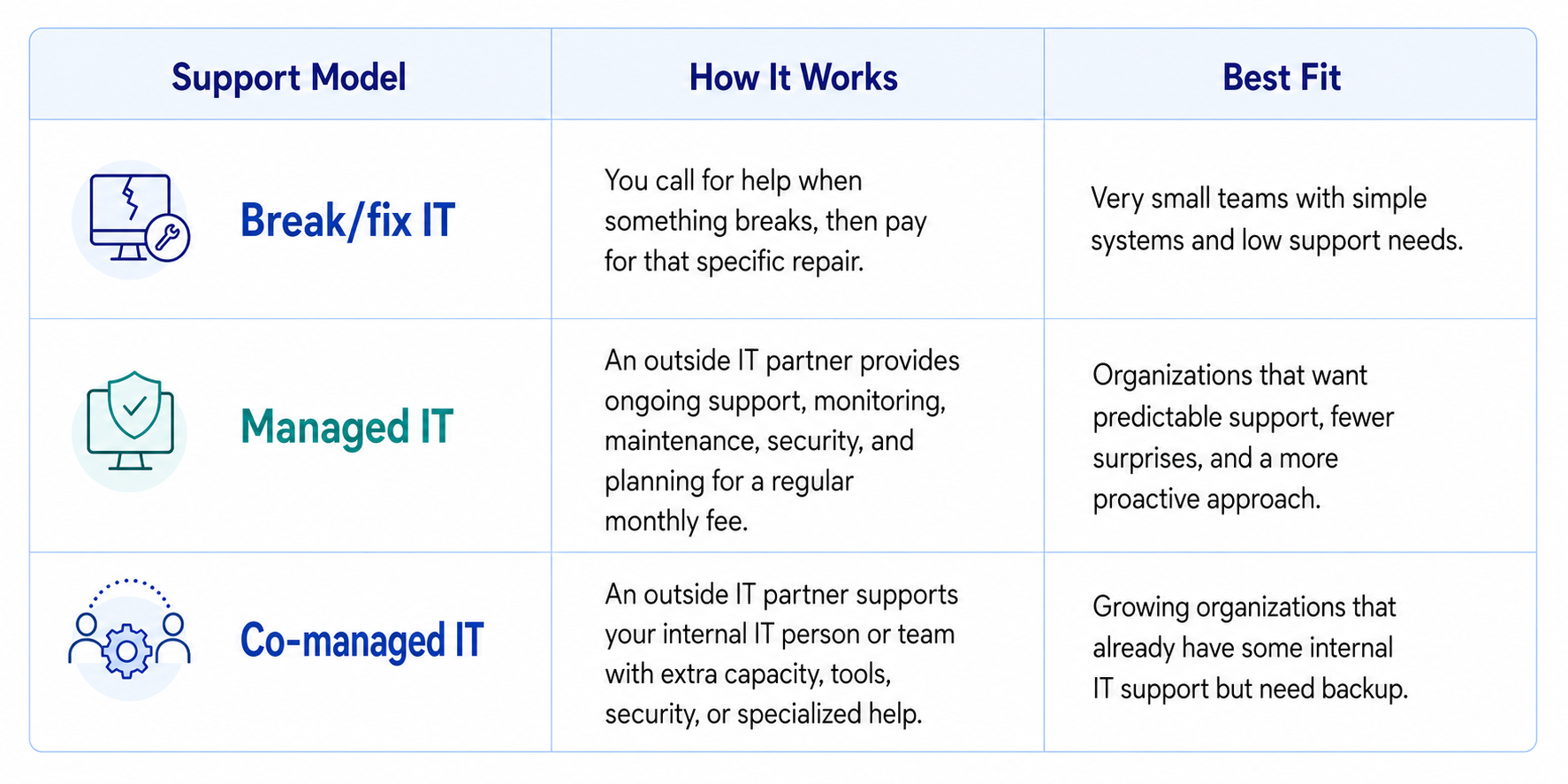
For most mission-driven organizations, break/fix support ends up costing more over time than it saves, since problems that go unnoticed for weeks tend to be more expensive to fix than ones caught early. If you already have someone handling IT internally, co-managed support is often the better starting point, it fills the gaps without replacing the person who already knows your systems.
What Should a Managed IT Service Plan Include?
A managed IT service plan should cover both everyday support and the behind-the-scenes work that keeps your systems reliable. For mission-driven organizations, the plan should be clear enough for leadership to understand and practical enough for staff to use.
Service Area
Help Desk and Technical Support
Microsoft 365 Management
Cloud Services
Backup & Disaster Recovery
Proactive Monitoring & Maintenance
Strategic IT Planning
What It Should Cover
Support for staff, volunteers, and team members when they need help with email, devices, software, passwords, printing, or file access.
Practical safeguards such as multi-factor authentication, email protection, device security, updates, and account access controls.
Setup and support for email, Teams, SharePoint, OneDrive, calendars, permissions, and secure file sharing.
Cloud solutions allow staff, volunteers, and board members to securely access files, applications, and collaboration tools from anywhere while supporting flexible and hybrid work environments.
Regular backups, recovery planning, and checks to make sure important data can be restored if something goes wrong.
Continuous monitoring identifies potential issues before they become disruptions. Regular maintenance, software updates, and performance checks help keep systems secure and running efficiently.
Technology should support the organization's mission, not create additional challenges. Strategic IT planning helps align technology investments with organizational priorities, improve budgeting, and prepare for future growth.
What Mission-Driven Organizations Actually Gain from Managed IT
The value of managed IT isn't the technology itself, it's what having it in place frees you up to do. When systems work the way they should, the gains show up less in your tech budget line and more in how your team spends its time.
- Predictable monthly budgeting.
One flat cost replaces the surprise invoices that come with break/fix support, so IT stops being a line item you have to explain to your board after the fact.
- Stronger protection for sensitive information.
Whether you're a nonprofit safeguarding donor records, a faith-based organization protecting member privacy, or an association managing client and financial data, a team actively monitoring for risk catches problems before they become the kind of incident that shows up in a funder conversation. - Less downtime during fundraising, programs, and events.
Systems stay reliable during the moments that matter most, a year-end campaign, a grant deadline, an event registration push, instead of failing right when you need them. - Better support for staff, volunteers, and committees.
Questions get answered by people who already know your setup, so a login issue or a broken file share gets resolved in minutes instead of sitting in someone's inbox for a day. - Technology that grows with your organization.
Adding a new program, a new location, or a new hire doesn't mean rebuilding your systems from scratch, your IT scales alongside your mission instead of holding it back.
How Do You Choose the Right IT Provider?
The right IT provider depends less on who has the longest feature list and more on whether they actually understand how your organization works. A few things tend to separate a good fit from a bad one.
Look for a provider who already works with mission-driven organizations, not one learning your sector on your dime. Someone who's supported a nonprofit through a grant deadline or a faith-based organization through a livestreamed service already knows the shape of your constraints, tight budgets, small teams, and work that can't wait for a support ticket to get answered.
Pay attention to how they price. Flat-rate, predictable billing tends to fit organizations working within grant funding or board-approved budgets far better than hourly or per-incident pricing, where a bad month can blow a hole in your budget without warning.
Ask how they handle communication. A provider worth keeping explains things in plain language, gives your team a clear place to go for help, and doesn't make you feel like you need a technical background to ask a question.
And notice how they talk about your mission. A provider who sees your organization as just another ticket queue is different from one who understands that a system failure during a fundraising event isn't just downtime, it's a disruption to the work you exist to do.
Questions to Ask Before Choosing an IT Provider
A good provider will welcome these questions, and how they answer often tells you as much as what they say.
- Are we locked into a long-term contract, and what happens if it's not working out?
Watch for vague answers here, this is often where hidden costs live. - What's your average response time when something breaks?
Ask for a real number, not "quickly." - What does your disaster recovery plan actually look like if we lost everything tomorrow?
They should be able to walk you through it, not just say backups are covered. - How do you support us through a busy season, like a fundraising campaign or year-end reporting?
This tells you whether they think in terms of your calendar or theirs. - What happens as we grow? Can this plan scale with us, or will we outgrow it?
A good provider has a clear answer, not a "we'll figure it out then." - How do you help us meet our obligations under BC's privacy law?
A provider working in this space should be able to answer clearly, not point you elsewhere.
How Do You Know It's Time to Switch IT Providers?
A managed IT provider should make technology easier to manage, not another source of frustration. If IT issues continue to disrupt daily operations or the relationship feels reactive instead of supportive, it may be time to consider a different approach.
- Slow Response Times
When support requests take too long to resolve, staff productivity suffers and important work can be delayed. Reliable IT support should provide timely assistance when it's needed most. - Recurring Technology Problems
The same issues shouldn't keep coming back. Frequent outages, recurring support tickets, or ongoing performance problems often indicate that underlying issues aren't being addressed. - Unexpected Costs
Technology spending should be predictable. If invoices regularly include unexpected charges or it's unclear what's covered under the agreement, it may be a sign that the current service model isn't meeting the organization's needs. - Security Is an Afterthought
Cybersecurity should be built into every managed IT service. If security recommendations are infrequent, software isn't kept up to date, or backup and recovery plans haven't been reviewed in years, the organization may be exposed to unnecessary risk. - Poor Communication
A strong IT partner communicates clearly, explains technology in plain language, and provides guidance that supports informed decision-making. When communication is inconsistent or overly technical, it becomes difficult to build trust and plan for the future. - Technology No Longer Supports the Mission
As organizations grow and evolve, technology needs change as well. If the current IT provider isn't helping plan for future needs or offering strategic guidance, it may be time to find a partner that can better support long-term goals.
How Much Does Managed IT Cost?
The cost of managed IT services varies depending on the size of the organization, the complexity of the IT environment, and the level of support required. Factors such as the number of users and devices, cybersecurity requirements, cloud services, and compliance needs all influence pricing.
Most managed service providers offer predictable monthly pricing, making it easier for mission-driven organizations to budget for IT alongside other operational expenses. Rather than paying for unexpected repairs or emergency support, organizations receive ongoing monitoring, maintenance, cybersecurity, and technical support under a consistent service plan.
While cost is an important consideration, it shouldn't be the only one. The lowest-priced option may not provide the level of support, security, or strategic guidance needed to reduce downtime and protect critical data. Evaluating the overall value of a managed IT service, including expertise, responsiveness, and proactive support, often leads to better long-term outcomes than focusing on price alone.
The right managed IT provider helps organizations make informed technology investments that support their mission, improve operational efficiency, and reduce the hidden costs associated with unreliable technology.

Managed IT Support Across Greater Vancouver and BC
Vancouver's mission-driven organizations aren't confined to one neighbourhood, and neither is the support they need. Whether your team works from a single office, several program locations, or a mix of staff and volunteers spread across the region, local IT support should be able to meet you where you are.
We work with organizations across Vancouver, Burnaby, Richmond, Surrey, North Vancouver, Victoria, and the wider Lower Mainland and Vancouver Island, along with mission-driven organizations elsewhere in BC. Being local means more than proximity. It means understanding the funding cycles, compliance expectations, and community networks specific to this province, not applying a generic template built for somewhere else.
If your organization operates across multiple sites, or has staff and volunteers working from home alongside a physical office, that's a common setup for us, not an edge case.